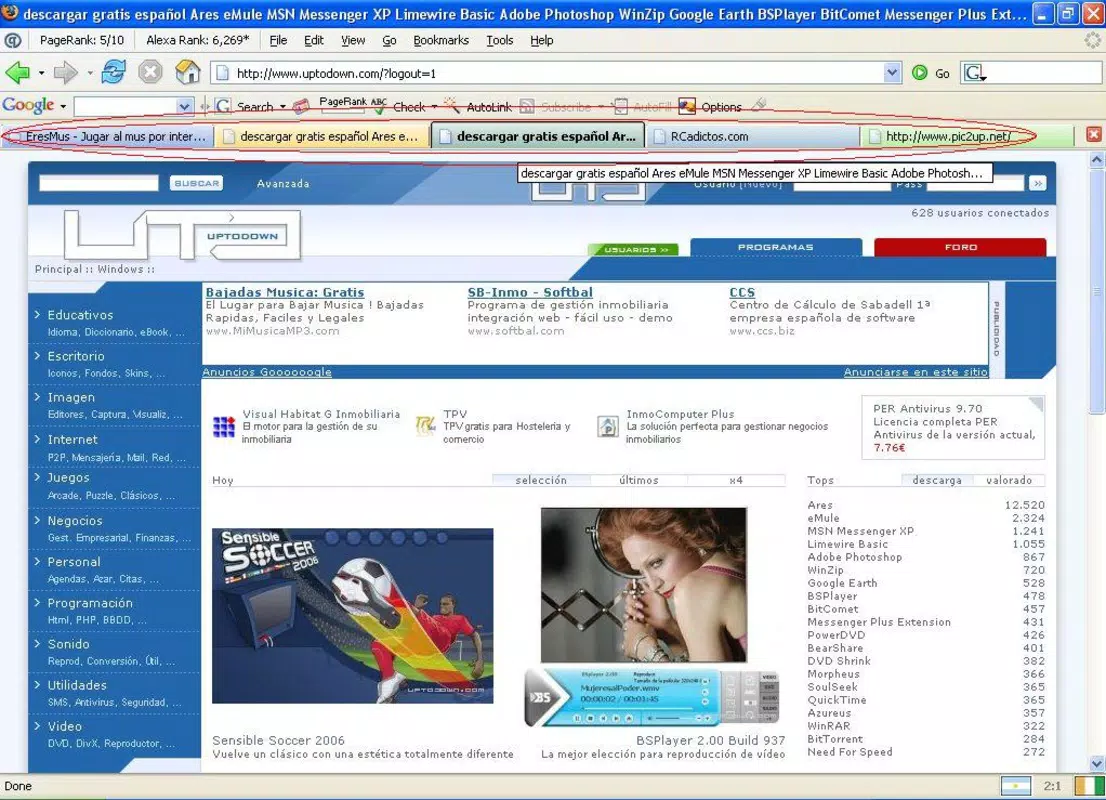

Download Colorful Tabs – Firefox add-on, tab colorizer, browser enhancement, productivity tool, visual organization, tab management
Overview
Colorful Tabs is a lightweight add-on designed to enhance the visual experience of using Mozilla Firefox. Its primary purpose is to transform the appearance of browser tabs by assigning unique, vibrant colors to each one. This simple yet effective feature helps users quickly identify and navigate between multiple open tabs, reducing cognitive load during multitasking. The app is especially beneficial for individuals who manage numerous websites simultaneously, such as researchers, content creators, and digital marketers.
By improving visual organization, Colorful Tabs addresses a common challenge in modern web browsing: tab clutter. With many users opening dozens of tabs at once, distinguishing between them becomes difficult. The app solves this by introducing a color-coded system that enhances spatial recognition and streamlines workflow. It is particularly useful in productivity-focused environments where efficiency and focus are critical.
The developer, Colorful Tabs, has maintained the add-on since its release on April 3, 2009, indicating long-term support and stability. Although the developer did not provide additional technical details, the app’s longevity suggests reliability and consistent performance over time. The tool fits seamlessly into the Firefox ecosystem as a utility that enhances user experience without altering core browser functionality.
Real-world use cases include managing research tabs, organizing project workflows, or separating work and personal browsing sessions. The app’s minimal footprint and ease of use make it a practical choice for both casual and advanced users seeking a more intuitive browsing interface.
Key Features & Functionality
- Vibrant Tab Colors: Automatically assigns distinct, eye-catching colors to each tab, enabling quick visual identification. This feature is ideal for users managing multiple tasks across different websites.
- Simple Installation: The add-on can be installed directly from the Firefox Add-ons marketplace without requiring complex setup or configuration, making it accessible to users of all technical levels.
- Enhanced Browsing Experience: The dynamic color scheme contributes to a more engaging and visually appealing interface, reducing mental fatigue during extended browsing sessions.
- Lightweight Design: At only 1.2 MB, the app consumes minimal system resources, ensuring it does not impact browser speed or performance.
For example, a student researching different topics can assign specific colors to tabs related to each subject—blue for science, green for history, red for literature—making it easier to switch between them. Similarly, a remote worker managing client projects can use color coding to separate workstreams, improving focus and workflow efficiency.
Each feature is designed with practicality in mind, focusing on usability and performance. The automatic color assignment eliminates the need for manual configuration, while the lightweight nature ensures compatibility with older or low-spec devices.
Interface, UX & Performance
Colorful Tabs integrates seamlessly into the Firefox browser interface, applying color enhancements directly to the tab bar without altering the layout or disrupting existing navigation patterns. The visual style is clean and unobtrusive, relying on bright, saturated colors that stand out against the default Firefox tab background.
Navigating between tabs remains intuitive, with color cues serving as immediate visual references. Users can switch between tabs with a single click, and the color differentiation supports faster decision-making during multitasking. The interface does not include additional menus or settings beyond basic activation, keeping the experience minimal and efficient.
Although the developer did not list formal performance metrics, the app’s lightweight size and long-standing presence suggest consistent responsiveness. It operates smoothly across various device categories, including low-end systems, without causing lag or memory spikes. Stability is maintained through minimal background processes and no known conflicts with other Firefox extensions.
Users can expect reliable performance during extended browsing sessions, with no reported crashes or freezes. The app’s design prioritizes speed and simplicity, aligning with modern UX principles that emphasize clarity and efficiency.
Platform Compatibility & Technical Requirements
Colorful Tabs is designed exclusively for the Mozilla Firefox platform. It is compatible with the latest versions of Firefox, though specific OS or version requirements were not listed by the developer. The app has a file size of 1.2 MB, making it a lightweight addition that downloads and installs quickly.
The developer did not specify minimum OS requirements or hardware limitations. However, given its small size and low resource usage, it is likely compatible with most modern desktop systems running Windows, macOS, or Linux. No mobile or tablet versions are currently available, as the app is designed for desktop browsers.
Users should ensure their Firefox browser is up to date to maintain compatibility and security. Updates are managed through the Firefox Add-ons marketplace, ensuring a seamless experience.
Pros and Cons
Pros
- Lightweight and fast, with minimal impact on browser performance
- Simple installation and zero configuration required
- Enhances visual organization and tab navigation
- Free to download and use with no in-app purchases
- Long-standing support and stable operation since 2009
Cons
- Available only for Firefox, not other browsers or mobile platforms
- No customization options for color schemes or rules
- Developer did not provide detailed technical specifications
- Limited to desktop environments
- May not suit users who prefer minimalistic or monochrome interfaces
FAQ
Is Colorful Tabs safe to install?
Yes, the app is available through the official Mozilla Add-ons platform, which verifies all extensions for security and compliance. It does not collect personal data or display ads.
Can I use Colorful Tabs on mobile browsers?
No, the add-on is designed exclusively for the desktop version of Mozilla Firefox and is not available for mobile platforms.
Does the app require an internet connection to function?
Once installed, Colorful Tabs operates offline. It does not require an active internet connection to apply color to tabs.
How often are updates released?
Updates are managed through the Firefox Add-ons marketplace. The developer has maintained the app since 2009, indicating ongoing support, though update frequency is not publicly disclosed.
Can I disable the color feature if needed?
Yes, the add-on can be easily disabled or removed from the Firefox extensions manager at any time without affecting browser stability.
Final Thoughts + CTA
Colorful Tabs remains a reliable, no-frills solution for users seeking to improve their browsing experience through visual organization. Its ability to assign unique colors to tabs enhances productivity, reduces confusion, and adds a touch of personality to the Firefox interface. Despite its simplicity, the app delivers tangible benefits for anyone managing multiple tabs daily.
While it lacks advanced customization and is limited to desktop Firefox, its lightweight design, free access, and proven track record make it a standout tool in the productivity category. It’s particularly valuable for students, professionals, and digital workers who rely on efficient multitasking.
For those looking to make their browser more intuitive and visually engaging, Colorful Tabs offers a practical and secure enhancement. Its enduring presence in the Firefox ecosystem speaks to its effectiveness and user satisfaction.
Download Colorful Tabs now


